Group rollups enable the "rolling up" or aggregation of information from the leaf nodes of a hierarchy to designated summary root- and sub-group nodes in the Group Service (GRP). When a rollup request is issued, it moves down the hierarchy to all relevant leaf nodes (facilities) searching for specified uniform data codes (UDCs), then rolls back up the hierarchy with the current value collected from the leaf nodes' specified current value service. This information is used to calculate totals, averages, and facility alarms.
Special summary nodes are designated in a GRP branch to indicate the place(s) data is to be rolled up. Each designated summary node enables the rollup of all its subordinate leaf nodes (facilities). The subordinate leaf nodes (facilities) contain the UDCs that represent the actual current value data you are interested in.
Calculations using this data are performed by the HyperPoint Scripting Service (HSS) system library script functions. Special rollup HyperPoints define the type of rollup to occur (total, average, or alarm) and must be created manually in the Point Service (PNT). Each rollup HyperPoint requires the specification of a rollup type and a facility/UDC combination. For instance, if you want total, average, and alarm rollup points for the UDC called PDIFF for Facility A/Node A, you must create 3 rollup points for Facility A/Node A: total + PDIFF, average + PDIFF, and alarm + PDIFF. The SYSLIB_GRP_ROLLUP_TEMPLATE point provides a means to easily copy numerous rollup points.
The calculation value produced by the rollup HyperPoint must be mapped to a UIS calculation "target" point for display and use in CygNet. The aggregation of UDC data can be automated for collection at regular intervals according to what is called "trigger time."
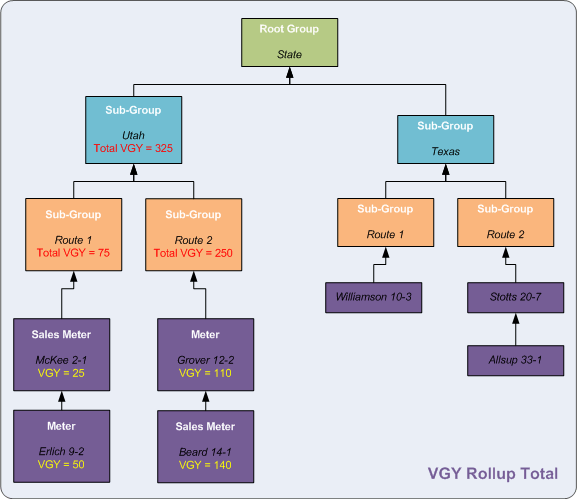
In the following example, rollup HyperPoints have been defined for three nodes: Utah, Route 1, and Route 2. In this case, these rollup HyperPoints calculate the total values from the purple leaf nodes (facilities) for the UDC called VGY. VGY means volume gas yesterday. So, values collected by the rollup HyperPoints represent totals for the previous day's gas volume. Notice that, in this case, aggregates compound at logical positions as they move higher up the hierarchy.
Filters can be applied to existing rollups. Instead of merely collecting all information for a UDC in a given rollup, you can filter out irrelevant nodes. For instance, you might want to view totals for only a subset of available meters, like sales meters in the above example. You can use a filter to get information from those meters only.
More:
 Creating a Group (Average or Total) Rollup

|
|
|

